Windscribe split tunneling test: one browser in, one out
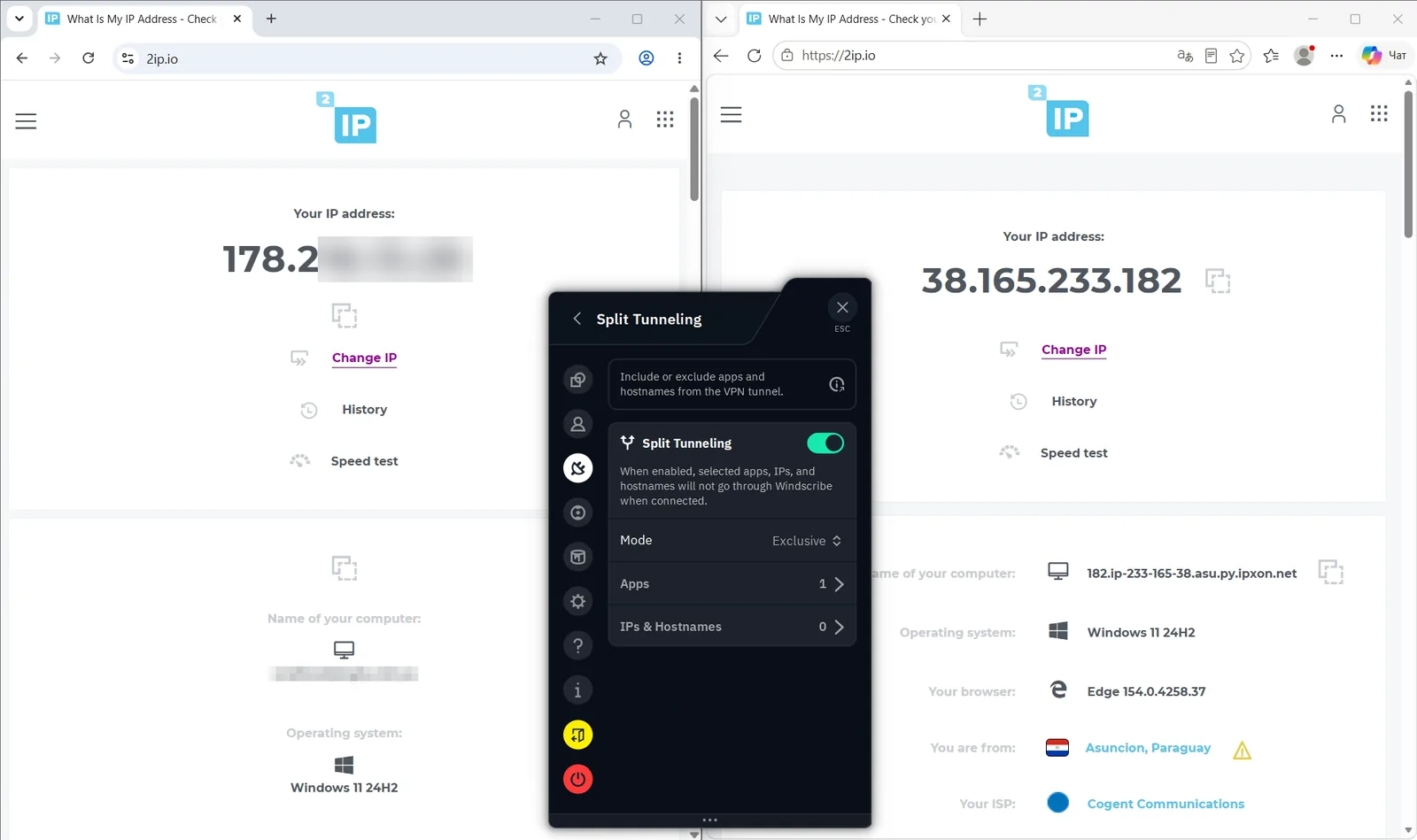
Two browsers on the same page, one excluded from Windscribe and one going through the tunnel, to show the feature doing what it says.
- Exclusive mode
- one app excluded
Two browsers, side by side
The settings panel shows Exclusive mode with one app and no IPs or hostnames.
How we tested
The same short procedure for all 11 VPNs in the September 2026 session.
- Baseline first. Every VPN started with a Speedtest result with the VPN off, on the same line: 293–298 Mbps down and up, 4–5 ms ping.
- Two routes. The nearest European server and one long-distance US server, with the VPN app on its defaults except where we name the protocol.
- Leak checks. A DNS leak test and a BrowserLeaks WebRTC test, recorded while connected.
- Streaming. Playback of a real title on BBC iPlayer and/or Netflix, with the VPN app visible on screen.
- Raw captures only. Screenshots and screen recordings, re-encoded for the web. The only edits are masks over account identifiers and the tester's real IP address.
What this test does not show
One feature, one app, one run.
Limits
- Only an app exclusion was captured; IP- and hostname-based rules were not tested.
- Whether the excluded app keeps working during reconnects, or leaks through the tunnel on other systems, is not covered.
Questions people ask
Short answers, based on our own captures and the data on this site.
What is split tunneling in Windscribe?
It lets you choose which apps or addresses use the VPN and which go straight to the internet. In Exclusive mode the apps you pick bypass the tunnel.
How did you verify it?
With two browsers side by side on the same page: one excluded, one through the tunnel. The excluded browser showed the tester's own address (masked) and the other showed a VPN exit address.
Does it work for IP addresses and hostnames too?
The settings panel has a separate IPs and hostnames list. We only captured an app exclusion (one app, zero IPs and hostnames), so we cannot speak to address-based rules.
Why use split tunneling at all?
Typical reasons are keeping a banking app or a local streaming service on your normal connection while everything else goes through the VPN.
Compare VPNs side by side
See current plans, prices and refund terms for the VPNs we recommend.